CD Menu Pro..............
 |  |
 | .jpg) |
Publishing electronic documents
Would you like to distribute your product or company presentation, electronic documentation or e-product(s) on a removable storage device such as a CD, DVD or USB stick?
Using CDMenuPro you can create an attractive and professional CD Menu for your CD or DVD and a front-end menu for your USB stick (USB flash drive)
Why CDMenuPro is the user's choice
Why do you need a CD Menu / Frontend Menu ?
Never distribute a portable medium without a user interface
An entirely amateurish impression is made by portable media not furnished with an Autostart application which informs the user directly about the medium's type and contents, and serves to guide the user. Users should never have to be responsible for figuring out which program or file to click on to obtain the desired information.
A presentation has to be impressive - the first impressions count
It goes without saying, of course, that the success of the business presentation will depend on how much impact your presentation makes. As well as making it attractive and professional, it is also essential to remember the old adage that first impressions count. When your customers insert the CD or DVD into their drives, you want them to be presented with a clear introduction frontend menu giving them all the options available. You certainly don't want to be making them search through all the files in the hope of finding your presentation. Getting off to a good start is essential, after all you don't want to annoy your users before you have even gotten started. A smooth and well presented introduction enables your presentation to shine through.
How does one create an impressive Frontend Menu ?
Without a need for programming skills, how does one create an Autorun menu for starting presentations and files which also project the company's or product's corporate design?
The solution: CDMenuPro - Autorun CD Menu Creator Software
CDMenuPro allows people without any programming skills to create professional Autorun CD menu applications for CD-ROM, DVD and USB flash drives, enabling programs and documents to be started dependably from these media.
No programming skills required
A host of project aids, templates and ancillary software modules enable anyone to achieve professional results in no time at all. Using drag-&-drop operations, you can easily transfer the documents and menu objects to be linked into the menu window.
Make an impression with your CD-, DVD-, USB- presentation
CDMenuPro sets your imagination and creativity free. Using background images and bitmap buttons as a help, you can create a graphic user interface that is tailor made to your needs both in terms of appearance and functionality.
Set yourself apart from the competition with an attractive and clearly designed CD Menu or Frontend Menu.
What is CDMenuPro ?CDMenuPro is a Windows software which lets you create a professional user interface (CD Menu) for your portable media (CD, DVD, USB stick). The CD Menu application provides buttons, menu bars, pop-up menus and selection boxes for starting your presentations, documents and programs. Placing no limits on creative freedom, this technique allows you to fully integrate your company's or product's Corporate Design. | 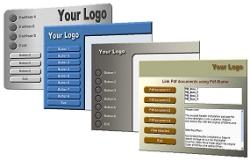 |
Why should you decide to use CDMenuPro to create your CD Menu / Frontend Menu ?
Your Time Is Valuable
Isn't it time you invested your time in designing an impressive and creative menu for your CD rather than wasting hours reading manuals or getting to grips with complex software.
Menu Design Made Easy
CDMenuPro is incredibly easy to use. Just imagine using its simple drag-and-drop capabilities. Menu objects such as buttons, list boxes, text, text fields and pop-up menus can be pulled easily from the object bar into the menu window. All you have to do is link your files to these objects - and you're done. You need absolutely no previous programming knowledge. Thanks to its drag-and-drop interface and large number of project assistants, CDMenuPro is easy to use and based on intuition
CDMenuPro - The Autorun Program
CDMenuPro has been designed to create all the files necessary for the autorun feature, to support a large number of trailers such as AVI, Intro, Sound, Splash Screen and to start programs and documents such as Pdf, Html and PowerPoint presentations reliably from your CD.
Protect Your Files against Unauthorized Access
CDMenuPro Version 5 was launched with additional software. ArchiveSafe has been designed to enable you to password-protect sensitive files on CD against unauthorized access.
Isn't it time you started using the right autorun software
CDMenuPro is being used across the world by thousands of users and has won a large number of awards.
Start today and create your first self-made CD Menu.
- Use CDMenuPro to create your very own professional CD autorun menu
- Set yourself apart from the competition with an attractive and clearly designed autorun menu.
- Just imagine the impression you will make on your users when your CD presentation starts automatically.
- Create Autorun CDs, Autorun DVD's and Frontend Menus using CDMenuPro
- Download your free 30-day trial version and create your first CD Menu project.
Download Here
